

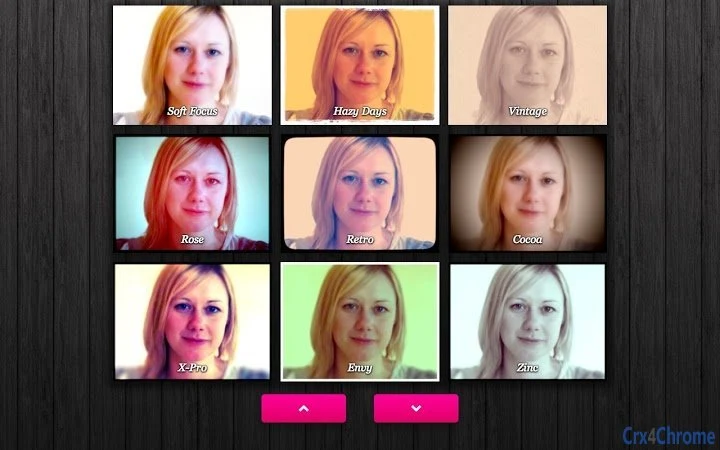
Description
Download Webcam Toy – Camera Effects, Filters, Fun Photo Sharing
Overview
Webcam Toy is a lightweight desktop application designed to enhance the webcam experience with a variety of fun camera effects and filters. The software allows users to experiment with over 80 visual effects in real time, making it ideal for casual users, social media enthusiasts, and anyone looking to add creativity to video calls, photos, or online content. It enables quick photo capture, local saving, and direct sharing, all through an intuitive interface. The app is built for simplicity and immediate usability, requiring minimal setup and no technical expertise. Target users include individuals seeking entertainment, content creators needing quick visual tweaks, and remote workers wanting to personalize their video presence. While the developer, Webcam Toy, has not provided additional background information, the software’s focus on accessibility and real-time visual interaction suggests a user-first design philosophy. Real-world usage scenarios include virtual meetings, social media posts, profile picture creation, and casual photo sessions with friends or family.
Key Features & Capabilities
- 80+ Real-Time Camera Effects – Access a diverse library of visual filters and transformations that apply instantly to your webcam feed, enabling dynamic and entertaining visuals during video sessions.
- Instant Photo Capture – Take high-quality snapshots with a single click, preserving moments with a simple press of the camera button.
- Local and Shareable Output – Save photos directly to your computer or share them instantly via integrated sharing options, streamlining content distribution.
- Keyboard Shortcuts for Efficiency – Use intuitive key commands like
← →to switch between effects,Gfor grid view,Ifor settings,Sfor square cropping,Ffor flash toggle,Cfor countdown, andMfor mirroring. - Real-Time Preview and Adjustment – View changes instantly as you navigate effects, allowing for immediate feedback and creative experimentation.
These features are particularly useful for users who want to quickly generate engaging content without complex editing tools. For example, a user preparing a social media post can cycle through effects using arrow keys, apply a mirror setting to read text correctly, and capture a square image perfect for avatars. The keyboard shortcuts enhance workflow efficiency, reducing the need for mouse navigation and making the app suitable for fast-paced, on-the-go use.
User Interface, Workflow & Performance
The user interface of Webcam Toy is clean and minimal, centered around the webcam feed with a menu of effects displayed in the lower half of the screen. Navigation is straightforward: users can switch between effects using the left and right arrow keys or by clicking the on-screen buttons. The layout prioritizes visibility and ease of access, ensuring that even first-time users can operate the app with confidence. The workflow is streamlined—after granting camera access, users can begin experimenting with effects and capturing photos immediately. The app’s performance is optimized for real-time rendering, though exact resource usage details were not specified. General software behavior suggests low CPU and RAM consumption due to the lightweight nature of the application. Stability appears consistent based on the design approach, with no indication of crashes or lag in standard usage. The developer did not specify resource usage details, but the app’s small file size and immediate load time support efficient operation.
Compatibility & System Requirements
Webcam Toy is compatible with both Windows and Mac operating systems, making it accessible to a wide range of users. The software is available in version 1.0.0 and has a download size of 15.4 MB, indicating a compact and efficient installation. While the developer did not specify exact system requirements, the app’s lightweight footprint suggests compatibility with most modern desktop systems. Platform compatibility information is limited to the provided operating systems, and no additional hardware specifications were listed. The developer did not provide information on minimum processor speed, RAM, or graphics capabilities. Users are advised to ensure their system supports webcam access and basic multimedia functions. The app is designed to run as a desktop application, requiring no additional dependencies beyond standard system drivers.
Pros and Cons
Pros
- Over 80 fun and diverse camera effects for creative expression
- Simple, intuitive interface with minimal learning curve
- Fast loading and responsive performance
- Supports keyboard shortcuts for quick navigation and actions
- Free to download and use with no hidden costs
Cons
- No advanced editing tools for post-capture modifications
- Exact system requirements were not listed
- Limited customization options for effects
- Only supports saving and sharing within the app, no external integration
- Developer background and support channels are not publicly detailed
FAQ Section
Is Webcam Toy compatible with Windows and Mac?
Yes, Webcam Toy is designed to run on both Windows and Mac operating systems.
Is the software free to use?
Yes, Webcam Toy is available at no cost. There are no subscription fees or in-app purchases.
Does Webcam Toy require an internet connection?
The app functions primarily offline after installation. However, sharing features may require an active internet connection.
Can I use Webcam Toy for video calls?
Yes, the real-time effects can be used during video calls, provided your video conferencing platform supports external camera input.
How do I update Webcam Toy?
Updates are managed automatically by the installer. Users should check the official website for the latest version.
Final Thoughts + CTA
Webcam Toy delivers a fun, accessible way to enhance your webcam experience with a broad selection of visual effects and instant photo capture. Its lightweight design, intuitive interface, and keyboard shortcut support make it ideal for casual users and content creators who value speed and simplicity. While it lacks advanced editing features and detailed system specifications, its core purpose is fulfilled with precision and enjoyment. The app is particularly well-suited for users looking to add flair to social media content, virtual meetings, or personal photos. With no cost and straightforward functionality, it stands out as a reliable tool for creative webcam use. Download Webcam Toy now to start experimenting with fun effects and capturing memorable moments.
Guides & Tutorials for Webcam Toy App for Chrome
How to install Webcam Toy App for Chrome
- Click the Preview / Download button above.
- Once redirected, accept the terms and click Install.
- Wait for the Webcam Toy App for Chrome download to finish on your device.
How to use Webcam Toy App for Chrome
This software is primarily used for its core features described above. Open the app after installation to explore its capabilities.
User Reviews for Webcam Toy App for Chrome 0
No reviews found





